
Modern websites are expected to load quickly, respond instantly, and provide a smooth browsing experience. A slow-loading page, delayed button clicks, or unexpected layout shifts can frustrate visitors and often lead them to leave the website.
To help developers measure and improve user experience, Google introduced Core Web Vitals—a set of performance metrics that focus on how users actually experience a webpage rather than simply how fast it loads.
Whether you’re building a personal portfolio, business website, or large web application, understanding Core Web Vitals is an important step toward creating faster, more reliable, and user-friendly websites.
What Are Core Web Vitals?
Core Web Vitals are a set of performance metrics developed by Google to measure the overall user experience of a webpage. These metrics evaluate three essential aspects of web performance:
- Loading Performance
- Interactivity
- Visual Stability
Unlike traditional performance tests that focus only on page speed, Core Web Vitals measure how users experience a website in real-world conditions.
As of today, the three Core Web Vitals are:
- Largest Contentful Paint (LCP)
- Interaction to Next Paint (INP)
- Cumulative Layout Shift (CLS)
Why Did Google Introduce Core Web Vitals?
Google’s goal is simple: reward websites that provide a better experience for users.
People don’t just care about speed—they also expect websites to respond quickly and remain visually stable while loading. Core Web Vitals help developers identify performance issues that directly affect visitors.
Although Core Web Vitals are considered one of Google’s ranking signals, they should primarily be viewed as a way to improve user experience rather than simply improve SEO.
The Three Core Web Vitals Explained
Each metric measures a different part of the user experience.
| Metric | Measures | Good Score |
|---|---|---|
| LCP | Loading Performance | ≤ 2.5 seconds |
| INP | Responsiveness | ≤ 200 milliseconds |
| CLS | Visual Stability | ≤ 0.1 |
Let’s understand each one in detail.
Largest Contentful Paint (LCP)
What Does LCP Measure?
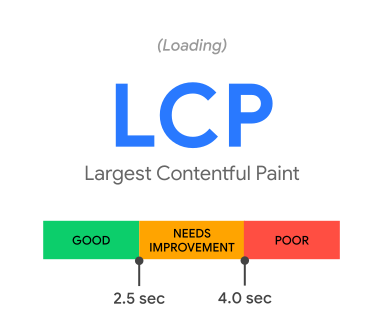
Largest Contentful Paint measures how long it takes for the largest visible element on a webpage to load.
This element could be:
- A hero image
- A large heading
- A featured banner
- A video poster image
For example, imagine opening an e-commerce website. The page background appears instantly, but the large product image takes several seconds to load. The page technically started loading, but users still feel like they’re waiting because the most important content isn’t visible yet.
That’s exactly what LCP measures.
Good LCP Score
- Good: 2.5 seconds or less
- Needs Improvement: 2.5 – 4 seconds
- Poor: More than 4 seconds
Common Causes of Poor LCP
- Large unoptimized images
- Slow server response time
- Render-blocking CSS or JavaScript
- Heavy third-party scripts
- Large web fonts
How to Improve LCP
- Compress and optimize images.
- Use modern image formats like WebP or AVIF.
- Improve server response time.
- Minify CSS and JavaScript files.
- Preload important assets.
- Use a Content Delivery Network (CDN).
Interaction to Next Paint (INP)
What Does INP Measure?
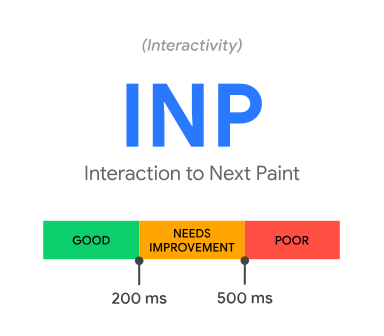
Interaction to Next Paint measures how quickly a webpage responds after a user interacts with it.
Interactions include:
- Clicking a button
- Opening a menu
- Typing into a form
- Selecting a filter
Imagine clicking the “Add to Cart” button on an online store. If nothing happens for half a second because JavaScript is busy, users may think the website is broken.
INP measures this delay between the user’s interaction and the browser updating the screen.
Good INP Score
- Good: 200 milliseconds or less
- Needs Improvement: 200 – 500 milliseconds
- Poor: More than 500 milliseconds
Common Causes of Poor INP
- Heavy JavaScript execution
- Long-running tasks
- Complex event handlers
- Too many third-party scripts
How to Improve INP
- Reduce unnecessary JavaScript.
- Split long tasks into smaller ones.
- Optimize event listeners.
- Avoid blocking the main thread.
- Load scripts only when needed.
Cumulative Layout Shift (CLS)
What Does CLS Measure?
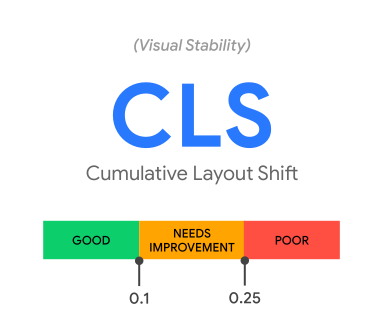
Cumulative Layout Shift measures how much the layout unexpectedly moves while the page is loading.
Have you ever tried clicking a button, only for an image to load at the last moment and push the button downward? That’s a layout shift.
CLS measures these unexpected visual movements.
Good CLS Score
- Good: 0.1 or less
- Needs Improvement: 0.1 – 0.25
- Poor: More than 0.25
Common Causes of Poor CLS
- Images without width and height attributes
- Ads loading dynamically
- Embedded content without reserved space
- Late-loading web fonts
How to Improve CLS
- Always specify image dimensions.
- Reserve space for advertisements and embedded content.
- Avoid inserting content above existing elements.
- Use
font-display: swapfor web fonts.
Why Core Web Vitals Matter
Improving Core Web Vitals benefits both users and website owners.
Some key advantages include:
- Faster website loading
- Better user experience
- Improved responsiveness
- More stable page layouts
- Lower bounce rates
- Higher visitor engagement
- Better search visibility
- Increased trust and professionalism
A fast, responsive website encourages users to stay longer and interact more with your content.
How to Measure Core Web Vitals
Several tools can help you analyze Core Web Vitals.
Google PageSpeed Insights
Analyzes real-world and lab performance while providing optimization suggestions.
Lighthouse
Built into Chrome DevTools, Lighthouse generates detailed performance reports during development.
Google Search Console
Shows Core Web Vitals reports based on real user data across your website.
Chrome DevTools
Allows developers to identify performance bottlenecks and debug rendering issues.
Best Practices to Improve Core Web Vitals
Improving website performance doesn’t always require major changes. Small optimizations often make a significant difference.
Some recommended practices include:
- Optimize and compress images.
- Use lazy loading for off-screen images.
- Remove unused CSS and JavaScript.
- Reduce third-party scripts.
- Enable browser caching.
- Use modern image formats.
- Optimize font loading.
- Improve server response time.
- Minimize layout shifts by reserving space for dynamic content.
Regularly testing your website helps identify new performance issues before they affect users.
Common Mistakes to Avoid
Many developers focus only on improving PageSpeed scores while ignoring real user experience.
Some common mistakes include:
- Optimizing only for desktop performance.
- Uploading large, uncompressed images.
- Loading unnecessary JavaScript libraries.
- Ignoring layout shifts caused by images and ads.
- Testing only once instead of monitoring performance regularly.
Remember, the goal isn’t just to achieve a perfect score—it’s to create a fast and enjoyable experience for visitors.
Conclusion
Core Web Vitals provide a practical way to measure how users experience your website. Instead of focusing solely on loading speed, they evaluate how quickly important content appears, how responsive the page feels, and how visually stable it remains during loading.
By understanding Largest Contentful Paint (LCP), Interaction to Next Paint (INP), and Cumulative Layout Shift (CLS), developers can build websites that are faster, more responsive, and easier to use.
Whether you’re creating a personal portfolio, an e-commerce store, or a business website, improving Core Web Vitals is an investment in both user experience and long-term website performance. Small optimizations made today can lead to happier visitors, better engagement, and a stronger web presence over time.